Staff management for trades: files, leave and deadlines in one place
Keep a file for every person with employment type, leave account and certificates, with or without their own login. AuftragsDesk reminds you in good time before a driving licence or certificate expires.
Staff data sits in binders, deadlines in someone's head
Remaining leave is recalculated by hand, overtime lives in a separate list, and an expired forklift licence is only noticed when it is needed.
What it looks like in AuftragsDesk
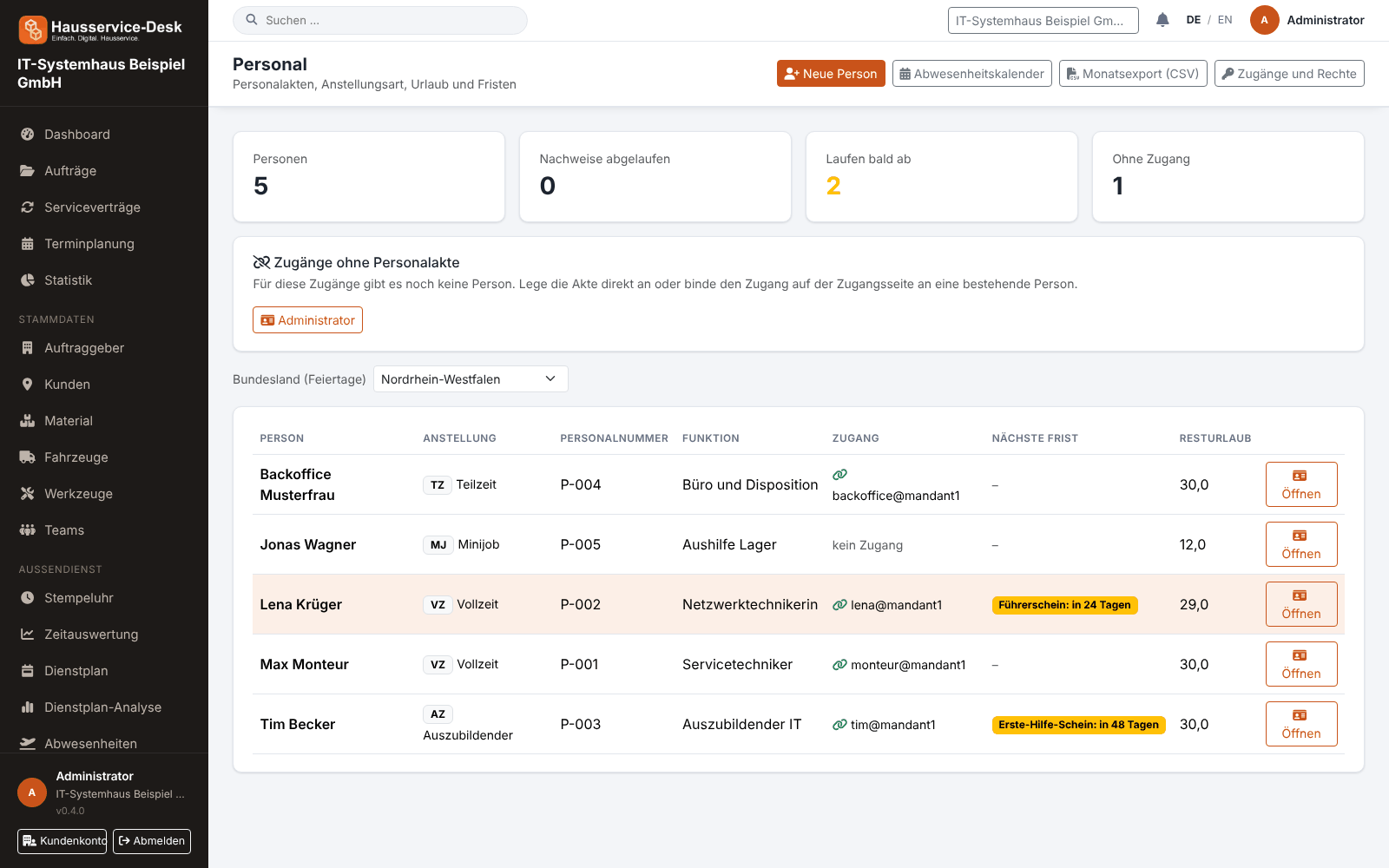
Views with sample data.
What AuftragsDesk does for you
Personnel file
Personnel number, role, employment type, weekly hours, start and end date and emergency contact per person.
Leave account with holidays
Entitlement, carry-over and special leave, days taken and requested; public holidays per state are taken into account.
Working time account
Target from weekly hours, actual from the time clock: overtime and undertime are visible without side calculations.
Certificates with reminders
IDs, driving licence and certificates with expiry date. The system sends a reminder before they expire.
With or without login
Temporary staff and people without a login get a file too. A login with a role can be added at any time.
Duty roster and absences
Plan shifts, record leave and sickness (half days too); the system warns about conflicts while planning.
How it works day to day
Add a person
Create a file or add one to an existing login, enter employment and leave entitlement.
Record certificates
Store driving licence, IDs and certificates with expiry date and reminder lead time.
Always in view
Leave, working time account and upcoming deadlines are visible per person and in the overview.
Frequently asked questions
Does every employee need their own login?
No. A personnel file works without a login. Anyone who should use the app or the office gets a login with a role in addition.
Are public holidays taken into account for leave?
Yes. You set the state for each person, and statutory public holidays are not counted when leave is calculated.
Which package includes staff management?
Staff files, duty roster and absences are features you can book individually. The pricing table on the home page shows which package includes which of them.
More solutions
Job management
Control orders, customers, documents and material in one place, from intake to billing.
Time tracking
A digital time clock right on the order, with breaks and reports per employee.
Installation report
Photos, hours and signature right on the order, as a PDF download.
Roster & scheduling
Shifts, appointments and absences in one plan, with planned-vs-actual comparison.
Material, fleet, tools
Stock, vehicle deadlines and inspection dates at a glance, with reminders.
Service contracts
Maintenance and facility services on a fixed schedule, with subscription billing and direct debit.
App for technicians
Everything for the job on one page: contact, route, workflow and job report.
Ready to try it?
Register, choose the plan that fits your business and get started. Cancel monthly, no setup fee.