
Roster and job scheduling for trade businesses
Plan shifts, appointments and absences in one calendar. The weekly view shows who is deployed where and when; the planned-vs-actual comparison shows how the plan matches real working time.
Who works where and when? When the plan only exists in someone's head
Vacation, sick leave and short-notice jobs upset any schedule, especially when it lives in spreadsheets or on paper. A shared plan prevents double bookings and follow-up questions.
What it looks like in AuftragsDesk
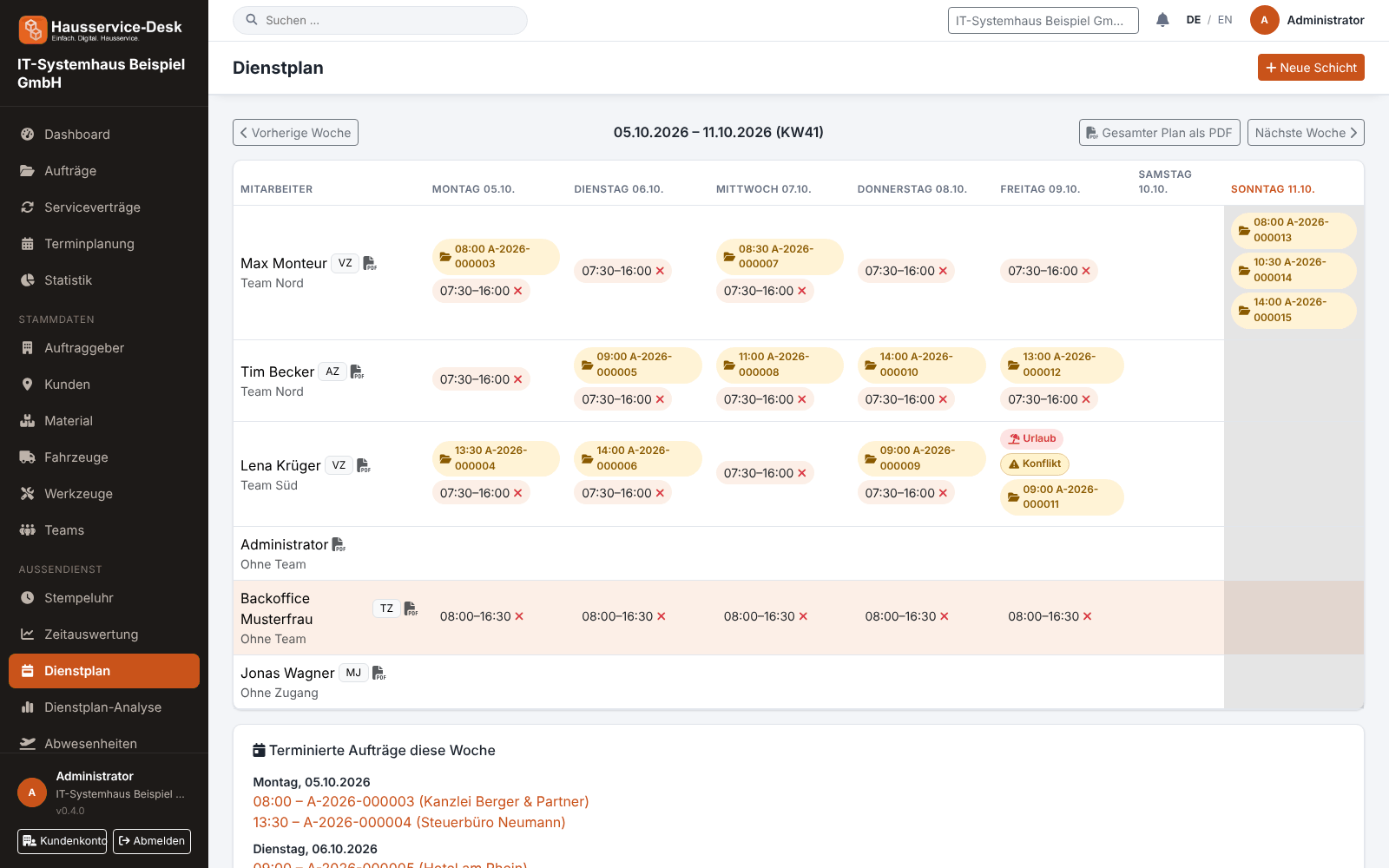
Views with sample data.
What AuftragsDesk does for you
Weekly roster
Create shifts per employee and day. The weekly view shows calendar week, shifts, absences and scheduled orders.
Scheduling: day, week, month
Schedule orders in the calendar and move appointments. Other appointments without an order, such as a team meeting, also appear in the roster.
Absences with approval
Employees request vacation, sick leave or other absences; the office approves or rejects, optionally with a reason. The employee is notified.
Planned vs. actual analysis
Compare planned and actually clocked hours per employee and month, including absence days.
Roster as PDF
Print the entire plan or give employees their own weekly plan as a PDF.
Notifications
Employees learn about new assignments, appointments today and decisions on absences, in the app and, if email delivery is set up, by email.
How it works day to day
Plan appointments and shifts
Schedule orders and create shifts in the weekly plan.
Account for absences
Approved absences appear in the plan so nobody is double-booked.
Review and share the plan
Share the plan as a PDF and later compare it with clocked hours in the planned-vs-actual view.
Frequently asked questions
Can every employee see their plan?
Yes. Employees see their own shifts and can download their weekly plan as a PDF. Only users with the “Manage roster” permission see and edit the whole plan.
How do vacation requests work?
The employee submits a request with period and type. Authorized users approve or reject, with an optional reason on rejection. Approved absences appear in the plan.
Does the software show the calendar week?
Yes. Scheduling, roster and analysis show the calendar week next to the date.
More solutions
Job management
Control orders, customers, documents and material in one place, from intake to billing.
Time tracking
A digital time clock right on the order, with breaks and reports per employee.
Installation report
Photos, hours and signature right on the order, as a PDF download.
Material, fleet, tools
Stock, vehicle deadlines and inspection dates at a glance, with reminders.
Service contracts
Maintenance and facility services on a fixed schedule, with subscription billing and direct debit.
App for technicians
Everything for the job on one page: contact, route, workflow and job report.
Staff management
Personnel file, leave account, working time account and deadlines for IDs and certificates in one place.
Ready to try it?
Register, choose the plan that fits your business and get started. Cancel monthly, no setup fee.